
Managing your money starts with understanding it. That’s why we’re excited to introduce Spending Reports, now available in the NetTrack mobile app for Pro subscribers.
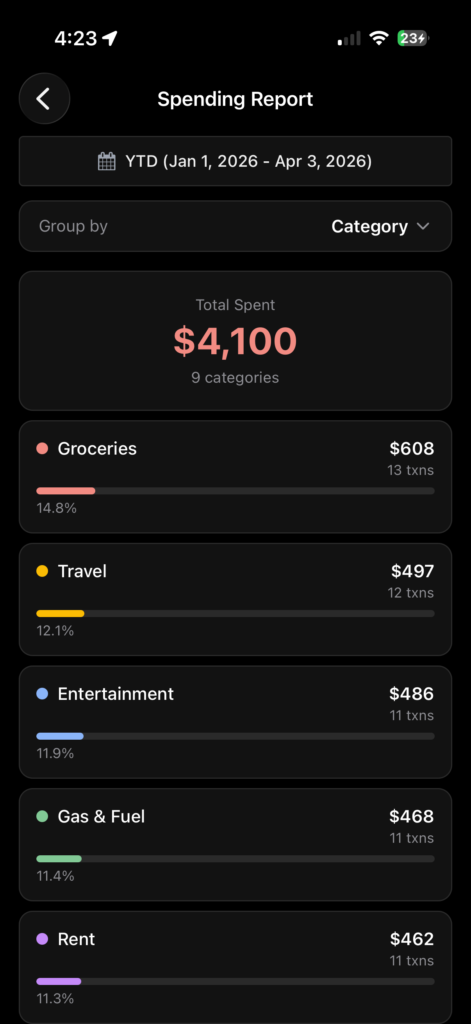
Three Ways to Slice Your Spending
Spending Reports let you analyze your expenses from the angle that matters most to you:
- By Category — See how much you’re spending on Groceries, Dining, Entertainment, Rent, and more. Quickly spot which areas of your life are costing the most.
- By Merchant — Find out exactly how much you’re giving to Amazon, Starbucks, or your favorite takeout spot. Sometimes the totals are surprising.
- By Tag — If you use custom tags to organize your transactions (like “vacation,” “wedding,” or “side hustle”), you can now see totals for each one.
Each group shows you the total amount, number of transactions, and its percentage of your overall spending — with a visual bar so you can compare at a glance.
Whether you’re trying to cut back on discretionary spending, track business expenses, or just get a clearer picture of your financial habits, Spending Reports gives you the visibility to make smarter decisions.
Update to the latest version of NetTrack to try it out.