
For most people, a car is one of the biggest things they own — and one of the biggest blind spots in their net worth. You either leave it out entirely, or you type in a number once and let it quietly go stale while the car depreciates underneath it.
NetTrack 1.6.4 fixes that. Add your car once, and its value stays current on its own.
Add a vehicle in one step
On the Add account screen, tap Track a vehicle and enter your VIN — it’s on your registration, insurance card, or the driver-side door jamb. Current mileage and a nickname are optional, but mileage makes the estimate noticeably sharper.
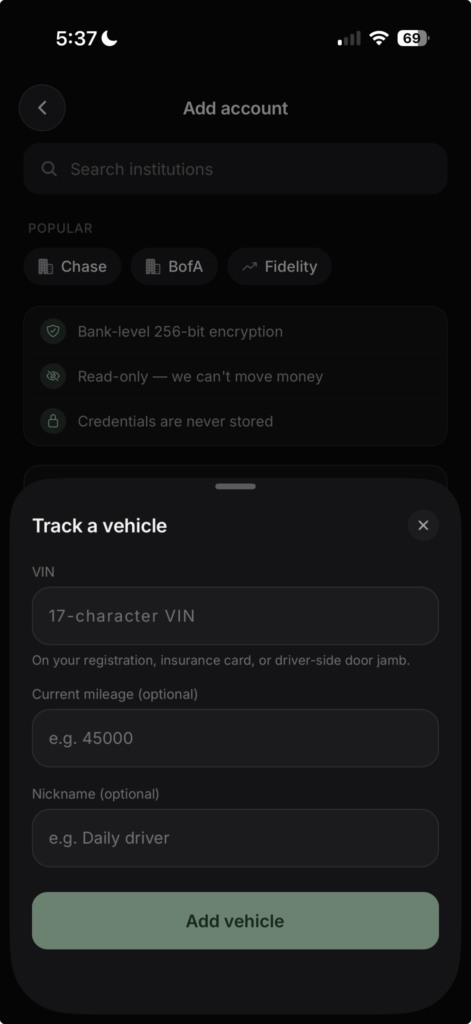
That’s it. No picking your trim from a dropdown, no guessing at condition tiers — the VIN identifies your exact year, make, model, and trim.
A real market value, not a guess
Your vehicle’s value comes from recent listings for cars like yours, adjusted for your mileage. You see the estimate, the range around it, and how it was built — how many listings, and how confident the estimate is.

The value refreshes automatically every month, so depreciation shows up in your net worth as it happens — no manual updates, no stale numbers. A history chart tracks the value over time, with the same 1M / 3M / YTD / 1Y / All ranges as the rest of the app.
A few details worth knowing:
- Update your mileage anytime from the vehicle screen — the next refresh prices against it.
- Disagree with the estimate? Set your own value. Your number is what counts toward your net worth, while the market estimate keeps updating alongside it so you can see the drift.
- Your budget stays clean. Vehicle value changes are tracked in net worth, but they stay out of your budget’s Ready to Assign by default — depreciation isn’t money you can spend.
Available now
Vehicle tracking is live in NetTrack 1.6.4 on the App Store and on the web, included in NetTrack Pro.
Got a boat, motorcycle, or something else without a VIN in our coverage? Tell us — we’re deciding what to value next.