One of the biggest goals for NetTrack has always been making it easier to stay aware of your finances without requiring you to open the app every day.
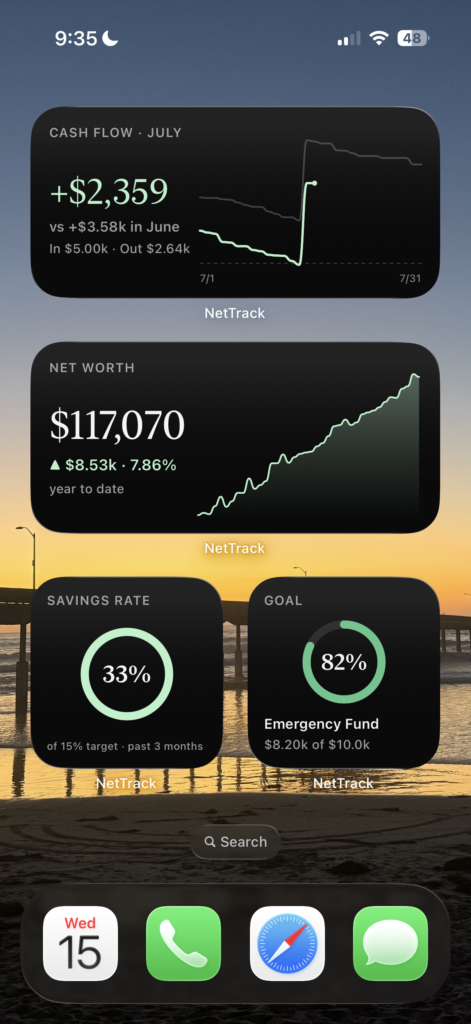
With NetTrack 1.6, we’re introducing iOS Home Screen Widgets—giving you a live view of the metrics that matter most every time you unlock your phone.
Your Financial Dashboard at a Glance
Instead of opening the app just to check your progress, your financial snapshot is now always visible.
Choose from four different widgets:
Net Worth
Watch your net worth grow over time with a beautiful chart showing your selected time period.
See:
- Current net worth
- Dollar and percentage change
- Trend visualization
- Automatic updates throughout the day
Perfect for staying motivated as you build wealth.
Cash Flow
Know exactly how your month is shaping up without opening the app.
The Cash Flow widget shows:
- Net cash flow
- Income vs. expenses
- Comparison to the previous period
- A running chart throughout the month
It’s one of the easiest ways to keep spending in check before the month is over.
Savings Goals
Keep your biggest financial goals front and center.
Whether you’re saving for:
- An emergency fund
- A house down payment
- A vacation
- A new car
…the Goal widget shows your progress with a clean circular indicator so you’re reminded of what you’re working toward every time you unlock your phone.
Savings Rate
Your savings rate is one of the strongest indicators of long-term financial health.
The Savings Rate widget displays:
- Your current savings rate
- Progress toward your target
- Historical performance
Small improvements compound into massive results over time, and having this metric visible every day makes it easier to stay consistent.
Customize Every Widget
Everyone tracks money differently.
Each widget lets you choose the time range that works best for you, whether you’re focused on this month, the last few months, or longer-term trends. Your preferences are remembered independently for each widget, so you can build the financial dashboard that’s most useful to you.
Privacy First
Financial information is personal.
If you use NetTrack’s Private Mode, your Home Screen widgets automatically respect that setting, masking balances while still showing your progress and trends. That means you can keep widgets on your Home Screen without worrying about exposing sensitive information when someone else picks up your phone.
How to Add NetTrack Widgets
Adding a widget only takes a few seconds:
- Long-press anywhere on your Home Screen.
- Tap the + button.
- Search for NetTrack.
- Choose your preferred widget size.
- Place it wherever you’d like.
Now your finances are only a glance away.
Available Now
NetTrack 1.6 is available today on iOS.
We can’t wait to see how you customize your Home Screen, and we’re already working on even more ways to bring your finances closer to you.
As always, thank you for supporting NetTrack and helping shape the app with your feedback. More exciting updates are coming soon.